
A VPN stops Wi-Fi owners from seeing which websites you visit or what you search for while you’re connected to their network. It does this by encrypting your traffic before it reaches the router, so your activity can’t be read from Wi-Fi logs.
If your landlord checks the shared network logs one day, all they’ll see is indecipherable code. What if your boss is monitoring the office Wi-Fi? All they can see is you’re using a VPN, but nothing more.
Using a VPN doesn’t delete your device history, and it doesn’t make you invisible online. The Wi-Fi owner can still see that you’re using a VPN, along with connection metadata, such as when you connected and how much data you’ve used.
So let’s examine what changes and what doesn’t when you switch a VPN on.
How does a VPN work with Wi-Fi?
When you browse on Wi-Fi without a VPN, the network has a front-row seat to your connection.
Even though most websites use HTTPS, which encrypts the content, the Wi-Fi owner can still see:
- The sites you’re connecting to
- Timestamps
- How much data moved back and forth
- Your device’s local network details
Think of it like sealed mail: the contents are hidden, but the outside of the envelope still shows where it’s going, when it was sent, and how big the package is.
That’s usually enough to build an accurate outline of someone’s online behaviour, even without seeing the exact pages you viewed.
But when you connect to a VPN, your device creates an encrypted tunnel to a remote server.
Every piece of data gets wrapped in military-grade encryption before it ever touches the router.
The Wi-Fi owner will now only see traffic going to a virtual IP address. They’ll see no domain sites or search queries. Just encrypted packets heading somewhere they will never be able to decipher.
Can your Wi-Fi network see what you search?
Without a VPN, a Wi-Fi network can reveal your online activity with alarming transparency.
Wi-Fi routers can log the websites you frequent, record timestamps, and track how long you spend on each site.
Modern encryption means the Wi-Fi owner can’t see specific content on HTTPS sites, but for example, they can see that you visited X.com at 2 a.m. and spent 47 minutes there.
So what does the Wi-Fi owner see:
- A connection from your device to a virtual (VPN) server IP address
- Encrypted traffic moving back and forth
- Timing and data volume
What they don’t see:
- The domains you visit
- Your search queries
- Which apps are you using
That’s why VPNs are so effective on public Wi-Fi: they remove the Wi-Fi network’s ability to read these labels.
Can Wi-Fi see what you search on incognito?
Incognito mode is one of the internet’s biggest misconceptions.
Private browsing prevents Chrome or Safari from saving your history locally. It also stops cookies from persisting after you close a tab, but it doesn’t hide your search activity from your network.
Your internet traffic still passes through the router like a regular Google search. The Wi-Fi owner will see the same domain sites, timestamps, and data volumes.
If your goal is to stop the Wi-Fi owner from seeing what you’re doing, incognito isn’t the tool that will save you.
For military-grade protection, you need VPN-enabled encryption.
Can the Wi-Fi owner see what sites I visit on my phone?
Yes, your device model doesn’t change the network’s view.
Whether you have an iPhone, Android, laptop, or tablet, if you’re using home or public Wi-Fi, then your traffic will still pass through the access point and router.
The only difference is that phones often hop between Wi-Fi and mobile data. If your phone switches to mobile data, that traffic won’t appear in Wi-Fi logs, but anything that stays on Wi-Fi will.
A VPN can block the most common forms of Wi-Fi snooping, but there are use cases worth acknowledging:
- They can see you’re using a VPN. On some Wi-Fi networks, that alone can trigger restrictions or throttling.
- They can see timing and data volume. Patterns can still be suggestive (for example, “something streamed for an hour”).
- If your device is managed (work/school), the organization can see more. Device management tools can enable monitoring that happens on the device, not just on the Wi-Fi network.
- If the VPN drops and your device goes back to regular Wi-Fi, you’re exposed again. This is why having a “kill switch” matters.
- On hotel or coffee shop Wi-Fi, you often have to open a login page before the VPN can connect.
Tip: A VPN is a strong privacy tool on public Wi-Fi, but don’t treat it as a magic wand that can override device-level monitoring.
Quick summary:
- A VPN prevents the Wi-Fi owner from seeing which sites you visit or what you search online
- The Wi-Fi owner can usually still see that you’re using a VPN, plus timing and data volume
- Incognito hides local history, not your network activity
- Phones, laptops, tablets; it’s the network connection that matters, not your device
How to stop the Wi-Fi owner from seeing your browsing history
If you want to stop a Wi-Fi network from tracking what you do online, you can either encrypt your Wi-Fi connection or avoid the network entirely.
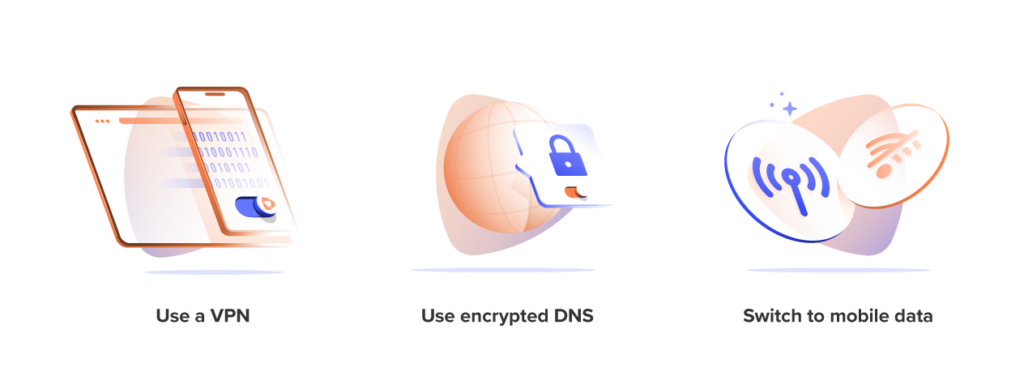
- Use a VPN. A VPN creates an encrypted tunnel between your device and a VPN server. That means the Wi-Fi router can still see that you’re connected and how much data you’re using, but it can’t see the websites you visit, what you search for, or which apps you’re using. If your VPN app has a kill switch, turn it on. It blocks internet traffic if the VPN drops, so your browsing doesn’t accidentally fall back onto the unprotected Wi-Fi network.
- Use encrypted DNS. Without a VPN, your DNS requests can reveal which sites you’re trying to reach, even if the pages themselves are protected by HTTPS. Turning on DNS-over-HTTPS (DoH) or DNS-over-TLS (DoT) encrypts those lookups, making it harder for the Wi-Fi network to log the domains you’re visiting. This won’t hide everything on its own, but it’s a strong privacy upgrade if you’re browsing without a VPN.
- Switch to mobile data for sensitive tasks. Mobile data bypasses the Wi-Fi network entirely, so the Wi-Fi owner can’t see that traffic. If you don’t trust a network, if the Wi-Fi has a captive portal you’d rather avoid, or if you’re doing something particularly sensitive, mobile data is the cleanest escape hatch.
Can the Wi-Fi owner see what sites you visit with a VPN?
With a VPN switched on, the Wi-Fi owner cannot see your browsing activity. All they’ll see is that your phone or laptop is connected, communicating with a virtual IP address, and the data being transferred.
Everything else is completely hidden behind encryption.
They can’t see your domains, search queries, or which sites you’re using or how long you spend on them.
Can the Wi-Fi provider see your history with a VPN?
The same protection applies to your Internet Service Provider (ISP).
Your ISP sees everything the Wi-Fi owner sees, plus more. It handles your connection at a deeper level and can build extensive profiles of your browsing habits. A VPN blocks all of this.
With a VPN, your ISP typically sees:
- a connection to a VPN server
- encrypted traffic
- timing and data volume
They know you’re using a VPN, but your internet activity stays private. Unless your VPN disconnects, with no kill switch to save you, or your device leaks traffic outside the tunnel.
Your Wi-Fi privacy in 2026
Wi-Fi networks are getting faster and smarter, and so is monitoring. Meanwhile, encryption is expanding across the internet, helping reduce what networks can learn by default.
A VPN is the simplest way to keep public networks from turning your online activity into a data stalking profile, and it takes seconds to switch on.
Connect. Encrypt. Carry on.
Frequently asked questions
If I use a VPN, can the Wi-Fi owner see what sites I visit?
They cannot see any sites you visit while connected. The Wi-Fi owner only sees a connection to a VPN server and encrypted data. Your browsing activity remains completely invisible to anyone monitoring the network.
Does a VPN work with Wi-Fi?
A VPN works seamlessly with any Wi-Fi connection. When you connect to Wi-Fi and activate your VPN, all traffic gets encrypted before leaving your device. No special configuration needed.
Can you use a VPN without Wi-Fi?
You can use a VPN on mobile data without any Wi-Fi. The VPN encrypts cellular traffic just like Wi-Fi traffic, protecting your browsing from your mobile carrier instead of a Wi-Fi owner.
Does a VPN need Wi-Fi?
A VPN needs an internet connection, but not specifically Wi-Fi. Any connection works: Wi-Fi, mobile data, ethernet, or satellite. The VPN creates an encrypted tunnel over whatever connection you’re using.
Is a VPN the same as Wi-Fi?
They’re completely different technologies. Wi-Fi is a wireless method of connecting to the internet. A VPN is a privacy tool that encrypts your traffic regardless of how you connect.
Does a VPN hide the websites you visit?
A VPN hides websites from your Wi-Fi owner, ISP, and anyone monitoring your network. However, websites themselves still know you visited them once your traffic arrives.
Can you see search history on a Wi-Fi bill?
Wi-Fi bills don’t show browsing or search history. They only show data usage amounts and billing information. Detailed logs exist on the router itself, not on any bill.